
Nov 12, 21
Aged Debtors – Now released for HPM
We’re happy to announce that a Billink ‘Aged Debtors’ function has been added to HPM!
-

To access this, go to Administration > Aged Debtors. (Ensure you are on version 3.7.0.28 or later)
-
Here you can filter by date and / or Outstanding Balance. Click the Refresh button to return the list of patients with a personal balance that meet the criteria selected.

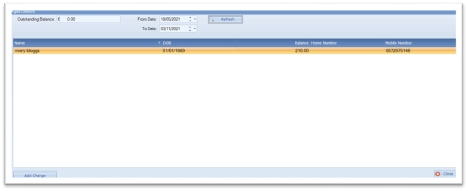
Please note, If a Billink payment request was sent for a charge for the patient, then this charge will not be displayed unless the original Billink payment request is cancelled and once the Billink Dashboard is updated (You must press Synchronise and wait for the Status to be updated).
- We recommend you double click and open each patients chart to confirm their balance is correct before completing the Batch Billink Payment requests.
- Select one or more charges from the list and click the Add Charge button.
- The Add Charge button will only show the Batch Summary if you are registered on Billink
Sending a Batch of aged payment requests
 After selecting ‘send batch’ a summary is displayed for you. If there are any patients with missing mobile numbers or unassigned credit notes on their chart we’ll show you that information here.
When you’re reach Click ‘Submit’ to send a Billink to all valid patients.
That’s it! Billink will now send outstanding payment requests to all selected patients at a rate of about 2-3 Billinks per second. Magic!

Founder ,
Billink Payments